


Maverik Rewards
4.63.45K Reviews
App Specs
- Version
- 7.3.13
- Updated On
- License
- Free
- Downloads
- 1,000,000+
- Developer
- Maverik, Inc
- Categories
- Business
- Platform
- Android, iOS
Screenshots
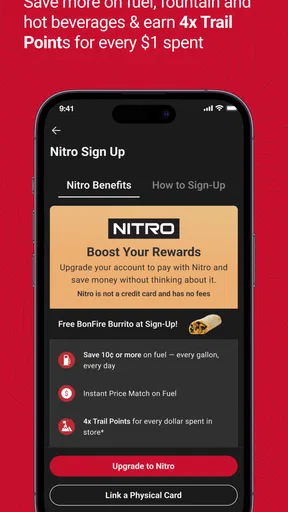
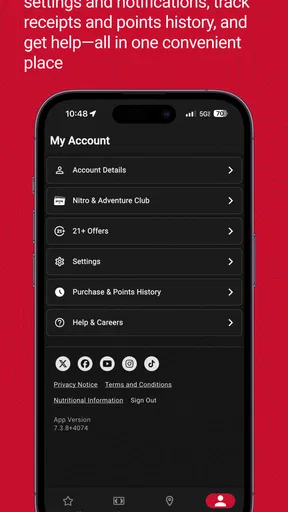
 Analysis by AppCompare
When I use a fuel-and-store rewards app, the key question is whether it helps at the moment I need it: while planning a stop, checking an offer, or getting ready to pay. Maverik Rewards is built around visits to Maverik, bringing rewards and store-finding tools into one place. That focus is useful if Maverik is already part of your routine, but it also means the app has less value if you rarely shop there.
It is a free business app from Maverik, Inc, and its 4.7 average from around 23,000 ratings suggests that many users find it worthwhile. I’d treat that as a helpful signal, not a promise that every visit will be frictionless: the value depends on how often you stop at Maverik and whether the available rewards suit what you actually buy. The app has over one million installs, is rated for Everyone, and its current version is 7.3.8. It first appeared in 2014, so it is an established loyalty option rather than a new experiment.
When a connection matters
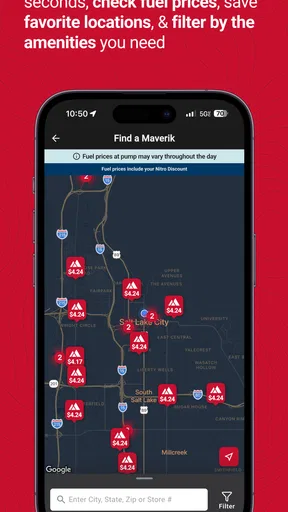
The most useful way to think about this app is as a companion for connected errands. Checking a nearby store or looking through current rewards is most practical when your phone can reach the service. On a road trip, I’d check the location before setting off rather than wait until I’m already at a junction with poor reception. That small habit turns the locator into a planning tool instead of something I’m relying on at the last second.
Offers and account details are also the sorts of things I would check before joining a checkout line. If a screen takes time to load, there is less pressure when I’m parked or waiting than when other customers are behind me. I wouldn’t assume every feature works without a connection, so I’d avoid making an unverified offline plan around a reward or store detail.
Better suited to planned stops than constant browsing
For everyday use, the app makes the most sense when Maverik is already on your route: a commute with a regular stop, a trip where you know you’ll need fuel, or a quick visit for a drink or snack. A practical routine is to open it before leaving, check the store you intend to visit, and review any reward that could matter to that purchase. You can then arrive with a clearer idea of what you want to do instead of exploring menus at the counter.
That approach is especially helpful for someone who wants a simple loyalty companion rather than a general shopping app. If you visit several different fuel or convenience-store brands, though, a single-brand program cannot replace all of them. I’d keep Maverik Rewards for Maverik stops and use other brands’ programs only where they fit naturally, rather than changing a route just to chase a small perk.
What to do when the app is slow
Mobile service can be uneven, particularly on a long drive or in an unfamiliar area. If the locator or a reward page does not load promptly, I’d stop trying to troubleshoot while moving and wait until I’m safely parked with a better connection. It is also sensible to open the app before entering the store, give the page time to load, and keep the intended offer in view if you plan to use it. Those habits reduce checkout pressure without assuming the app has a particular recovery or offline feature.
Worth Reading Before You Choose

EA SPORTS FC Mobile 26 Is a Bigger Football Game, but It Takes Time

Flipboard Shows What News Apps Must Do Beyond the Feed

Switching to Android Auto Means Rethinking Your Driving Routine

Google Calendar Makes a Crowded Week Easier to Manage

Ludo King Makes the Most of the Minutes Between Plans

Baby Panda World Brings Quick Play to Modern Phones, but Its Game Library Feels Busy
If something still will not appear, I would treat the app as a convenience rather than the only way to manage a stop. Check the details again when the connection improves, and avoid counting on an offer until you can see how it applies. This is a real limitation of a phone-based rewards workflow: a weak signal can make a straightforward task feel awkward at exactly the moment you want speed.
Use it without turning every stop into screen time
I would keep data-conscious use simple. Review the app when you have a stable connection, then use it for a specific task—finding a store, checking a reward, or preparing for a visit—instead of repeatedly refreshing pages on the road. This also helps keep attention where it belongs: on driving, not on comparing offers from behind the wheel.
Notifications may help you notice promotions, but they are not essential to the basic idea of a rewards app. If alerts become distracting, I’d manage them in the phone’s settings and check the app when it suits my routine. That is a better trade-off for someone who wants occasional savings without inviting constant prompts or treating every purchase as a points opportunity.
Getting Started with Maverik Rewards
Diving into the world of Maverik Rewards is super easy. Just download the app from your app store—it's available on both Android and iOS, so no worries there. Once you're in, setting up your account is a breeze. They ask for the usual—email, password, and a few details. Before you know it, you're ready to start racking up those points!
For a first visit, I’d take a minute to get comfortable with the screens before I’m ready to pay. The app is free, but that does not mean every reward automatically fits every shopper: look at what is available and decide whether it matches a purchase you would make anyway. The best loyalty habit is usually to earn benefits on a normal stop, not to spend extra just because an offer is visible.
Features That Stand Out
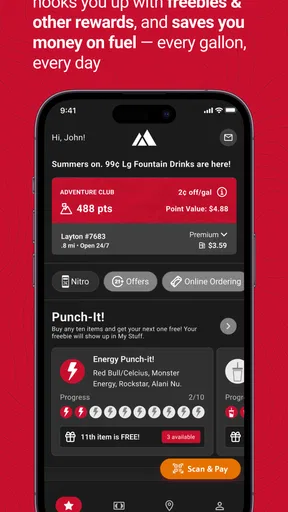
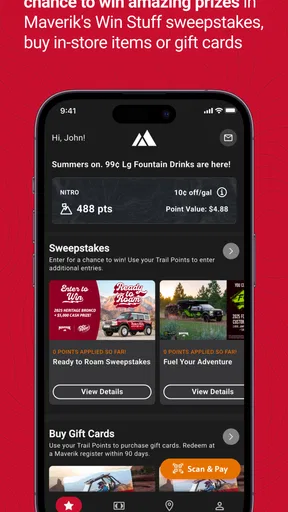
The app is packed with features that make every trip to Maverik more rewarding. One of the coolest things is the ability to track your points in real-time. No more guessing how much you've earned; it's all right there on your screen. Plus, you can check out the latest promotions and special offers tailored just for you.
In practice, I’d use the points display as a quick check before deciding whether to redeem or keep building toward something more useful. A balance is most valuable when it changes a choice you were already making; it is less persuasive if you have to make extra trips to use it. Checking the balance at a calm moment also gives you a chance to understand the reward options without holding up a line.
The store locator can serve a different purpose from a general map. A map is good for comparing routes and nearby businesses; Maverik Rewards is more focused on helping you find a Maverik stop that fits the errand. When travelling, I’d compare the locator’s result with the route I’m already taking rather than detour automatically. Convenience matters more than a reward if a stop adds time or takes you away from your destination.
Rewards and Redemption
Now, let's talk rewards. With Maverik Rewards, every purchase gets you closer to redeeming awesome stuff. Whether it's discounts on fuel or free snacks, the options are pretty tempting. The app makes it easy to see what rewards are available and how many points you need to snag them.
Rewards are most appealing when they line up with something you would buy regardless, such as a regular fuel stop or a snack you already planned to pick up. I would compare the effort of reaching a reward with its usefulness, rather than treating a growing balance as savings by itself. That is the main trade-off with any store loyalty scheme: the benefit is tied to shopping at that retailer, so it is not a substitute for comparing prices or choosing the stop that best suits your trip.
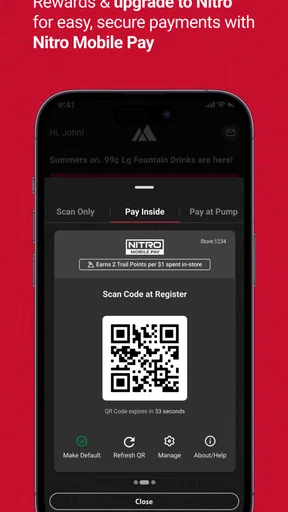
Redeeming points is straightforward. Just tap on the reward you want, and you’ll get a code to show at the checkout. Easy peasy! It's like getting little gifts every time you fill up your tank or grab a coffee.
For a less rushed redemption, I’d decide what I want before reaching the register and have the relevant screen ready while safely stopped. If you are unsure whether a particular reward suits your purchase, checking its displayed details first is better than discovering a mismatch at checkout. That simple workflow is useful for occasional users too: you do not have to browse every promotion, only the ones relevant to that visit.
Who gets the most from it
I’d recommend it most to people who already stop at Maverik often enough for rewards and store information to be genuinely convenient. It can also help occasional travellers who know a Maverik location is on their route and want to check before pulling off. For someone who rarely visits the chain, the account and app may not earn a place on the home screen; a regular maps app and the loyalty programs for stores they actually use may be more practical.
A realistic example: before a weekend drive, I’d check whether a Maverik is near the route, then look at the rewards before choosing a snack or planning a fuel stop. At the store, I’d use the app for the relevant offer rather than browse while standing in line. If the location is inconvenient or the reward does not match what I need, I’d carry on with the original plan. The app should make an existing stop better, not dictate the trip.
Where it fits among other options
Compared with a general navigation app, Maverik Rewards is more useful for Maverik-specific loyalty tasks, while a map is usually the better tool for broad route planning and comparing many kinds of places. Compared with a fuel-brand app from another retailer, its natural advantage is relevance to Maverik visits, not universal coverage. I would not expect one chain’s rewards app to be the best choice for every stop, and I would avoid installing several programs unless I actually use those brands.
The practical question is whether the rewards and store-finding convenience outweigh keeping another account and app on your phone. If you already visit Maverik, that is an easy case to make. If you are choosing a stop from scratch, compare the route, the purchase you need, and the reward together; a points balance alone is not a reason to go out of your way.
Why You'll Love It
If you're a fan of convenience, the Maverik Rewards app is a win. It's designed to fit seamlessly into your lifestyle, making each visit to Maverik more enjoyable. The app is intuitive, and everything is just a tap away. Plus, who doesn't love saving money and getting rewards?
Another thing I love is how the app keeps you in the loop with notifications about new offers and promotions. It's like having a personal shopper who knows exactly what you like. And if you’re worried about privacy, the app is secure, ensuring your info stays safe.
I’d keep expectations grounded: notifications can surface offers, but they are only helpful if they match your plans, and account-based rewards mean you are choosing to engage with a retailer’s program. I would review the prompts and settings in the app and on my phone, then keep only the alerts that are useful to me. That gives the convenience a chance to help without letting promotions set the pace of every errand.
Final Thoughts
In a nutshell, the Maverik Rewards app is a must-have for anyone who frequents Maverik stores. It's packed with features that make shopping and fueling up more rewarding. From tracking points to redeeming exclusive offers, the app does it all with style and ease.
So, if you're looking to make the most of your Maverik visits, don't wait any longer. Download the app, sign up, and start enjoying the perks today. Happy adventuring!
My verdict is positive, with one clear condition: it is most worthwhile when Maverik is already part of your normal routine. I like the combination of rewards and store finding, but I would not rely on a page loading at the last second or treat a promotion as a reason to make an unnecessary purchase. Plan the stop, check what matters while connected, and use the app as a helpful extra rather than the centre of your trip.
Pros
- User-friendly interface for easy navigation.
- Exclusive offers and discounts for members.
- Convenient tracking of reward points.
- Personalized offers based on preferences.
- Fast and responsive customer support.
Cons
- Limited availability of reward locations.
- Occasional app crashes and bugs.
- Requires constant internet connection.
- Some rewards have short expiration dates.
- Limited features for non-members.
FAQs for Maverik Rewards
What is Maverik Rewards and how does it work?
Maverik Rewards is a loyalty program app designed for customers of Maverik convenience stores. By signing up, users can earn points on purchases, which can be redeemed for discounts, free products, or special offers. The app provides an easy way to track points, view available rewards, and access exclusive deals.
How do I earn points with Maverik Rewards?
Points are earned by making purchases at Maverik stores. Simply scan your Maverik Rewards card or app at checkout to accumulate points. Additional points can be earned through promotional offers, special events, or by purchasing specific products. The app also notifies users of opportunities to boost their point totals.
Are there any costs or fees associated with using Maverik Rewards?
No, Maverik Rewards is free to join and use. There are no membership fees or hidden costs. Users simply download the app, register, and start earning points. The app is designed to provide value by offering exclusive deals and rewards without any financial commitment.
Can I use Maverik Rewards across multiple devices?
Yes, Maverik Rewards can be accessed on multiple devices. Simply download the app on your smartphone or tablet and log in with your registered account. This allows you to track your points and rewards across any device seamlessly, ensuring you never miss an opportunity to save.
What should I do if I encounter issues with the app?
If you experience problems with the Maverik Rewards app, there are several support options available. First, ensure your app is up-to-date and your device meets the necessary requirements. If issues persist, contact Maverik customer support via the app or their website for assistance. They offer help with troubleshooting and resolving app-related problems.


